Student instructions
Student instructions
Completion requirements
1. General
Remember when working in Moodle:
- Remember to save your work every 5–10 minutes.
- Moodle will automatically end your session and log you out if you have been inactive for 3 hours. Therefore, it is important to save your work regularly. This is especially important if you are writing an essay or taking an exam directly in Moodle. The same applies to all other written work, such as Wiki pages and assignments.
- If any setting or other item is unclear, click the ? icon to view instructions related to that specific item.
- When using the PoodLL audio and video recording tool, remember to allow your browser to access your microphone and camera. Also make sure that your computer's web browser is up to date. Do not use a smartphone or tablet.
- Your browser must have cookies enabled to use Moodle. Cookies are usually enabled by default, but if they are not, you can enable them in your browser settings.
- Please note that messages (e.g. announcements) may be delivered to email with a delay, even if you select Send now. The message will, however, be queued for sending immediately.
- The maximum file size in Moodle is 250 MB. Attachments larger than this (such as videos) cannot be submitted to assignments.
Logging out:
- Remember to log out of Moodle when you leave, especially if you are using a shared or public computer.
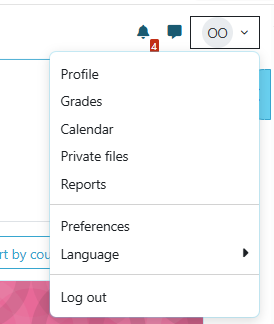
- To log out, click your name in the upper-right corner and select Log out.